

A complete paystub should show who paid the wages, who received them, the pay period, gross earnings, deductions, taxes, year-to-date totals, and final net pay. The federal Fair Labor Standards Act requires the employer to keep the underlying records (the DOL's 29 CFR 516 recordkeeping rule), but paystub delivery rules mostly come from state law. Many states require a wage statement on payday, and a smaller group enumerates specific line items and penalties. Texas requires a written earnings statement at the end of each pay period under Labor Code §62.003 even though it lacks a §226-style enumerated list. A few states (Florida, Alabama, Georgia, Tennessee) impose little or no content mandate at all. A California-grade layout is the safest baseline because it covers most common wage-statement fields, but employers should still check state-specific delivery, electronic consent, sick/PTO, industry, and timing rules before treating any template as fully compliant. Lenders, landlords, and screening platforms read the document holistically and run reconciliation checks regardless of where the stub was issued.
A complete, compliance-ready paystub carries twelve information zones. Not every state statute names all twelve zones in the same way, and federal law mainly requires employers to keep payroll records rather than print a universal paystub. But a nationwide paystub template should include all twelve zones because together they cover the strictest state wage-statement rules, payroll reconciliation, lender review, landlord screening, and employee record needs. The zones usually carry:
- Employer block (legal name, address, federal EIN last-4)
- Employee block (legal name matching W-2, last-4 SSN, ID, department, address)
- Pay-period info (start, end, pay date, frequency)
- Earnings (every pay type, broken out by rate, with YTD)
- Hours worked (per category for nonexempt where state law requires it; implied figure for salaried-exempt where verifier readability matters)
- Pre-tax deductions (401(k), HSA, FSA, §125, each itemized with YTD)
- Tax withholdings (federal, FICA, state, state-program lines, local)
- Post-tax deductions (Roth 401(k), garnishments, union dues)
- Employer contributions (sidebar: 401(k) match, health, FUTA, SUTA)
- Year-to-date totals (running column on every line)
- PTO balances (accrued, used, available; vacation/sick separated)
- Net pay and payment method (DD last-4 or check number)
The math has to reconcile in three directions: within the period, across the year, and against the W-2 at year-end. Otherwise a verifier rejects the stub before any state mandate is even considered. If you need to model gross-to-net by state before reading a real stub, the MyStubs paycheck calculator can help model the period reconciliation before you compare it to a real stub.
Paystub Generator
Create a paystub with all twelve fields
The MyStubs paystub generator builds professional paystubs with employer details, employee information, pay-period dates, earnings, hours, deductions, taxes, YTD totals, PTO balances, and net pay — the same twelve information zones this guide walks through.
Create a Complete PaystubThe Federal Floor and the Eleven Strict States
The DOL's Fact Sheet 21 is the federal source: the employer must keep employee name and address, SSN, occupation, hours worked each workweek, regular rate, total earnings, every deduction, and pay-period dates on file. Eleven states enumerate specific items with per-violation penalties: California, New York, Washington, Oregon, Hawaii, Massachusetts, Colorado, Illinois, New Mexico, Maine, and Vermont. California's Labor Code §226 is the most-copied template: nine specific items, with PAGA penalties of $50 / $100 per employee per pay period. New York's Wage Theft Prevention Act (Labor Law §195.3) goes further with twelve items plus a translated hire notice.
| State | Statute | Items required | Per-violation penalty |
|---|---|---|---|
| California | Lab. Code §226 | 9 specific items | $50 / $100 per period |
| New York | Lab. Law §195.3 (WTPA) | 12 items + hire notice | $250 / period · $5K cap |
| Washington | RCW 49.46.020 | 5 items | $500 / employee |
| Oregon | ORS 652.610 | 9 items | $250 / period |
| Hawaii | HRS §388-7 | 7 items | Civil + criminal |
| Massachusetts | M.G.L. c.149 §148 | Stub on every payday | Treble damages |
| Colorado | C.R.S. §8-4-103 | 8 items | $50 / period |
| Illinois | 820 ILCS 115/14 | Itemized statement | $250 + actual damages |
| New Mexico | NMSA §50-4-2 | 5 items | Civil penalty |
| Maine | 26 MRSA §665 | 6 items | $50 / violation |
| Vermont | 21 V.S.A. §342 | 5 items + leave balance | Civil penalty |
| Texas | Tex. Labor Code §62.003 | Earnings statement with employee name, rate of pay, total pay, itemized deductions and purpose, net pay, and hours/units where applicable | TWC wage-claim enforcement |
Texas often gets cited as a "no-mandate" state because there's no §226-style enumerated list. That's wrong. Texas Labor Code §62.003 requires the employer to deliver a written earnings statement to each employee at the end of each pay period that shows the employee's name, the rate of pay, the total pay, deductions itemized, the net pay, and the hours worked (or units of production where applicable), enforced by the Texas Workforce Commission through the wage-claim process. The misconception persists because federal authority (FLSA) only requires recordkeeping, not delivery. The twelve-zone framework below uses a California-grade layout populated with a real New Jersey paystub. A template that satisfies Sacramento covers most of the fields Jersey City, Boston, Chicago, and Austin verifiers expect, though employers should still confirm state-specific delivery, notice, and leave-balance rules.
Paystub Generator
Create your paystub in minutes
Build a professional paystub with built-in 2026 tax math, all 50 states, and instant PDF download.
Create Your PaystubDocument Breakdown
A complete paystub partitions into twelve zones. Every state-mandate framework (California's nine-item §226, New York's WTPA twelve, Washington's five, and so on) is satisfied when each zone carries its required data. The annotated figure below is a real semi-monthly New Jersey paystub for Anika Sharma (Jersey City, $78,000 salary, 6 % traditional 401(k), $135 §125 health, period ending April 15, 2026). Hover or focus any numbered chip for the zone name. The chip labels themselves are the legend.
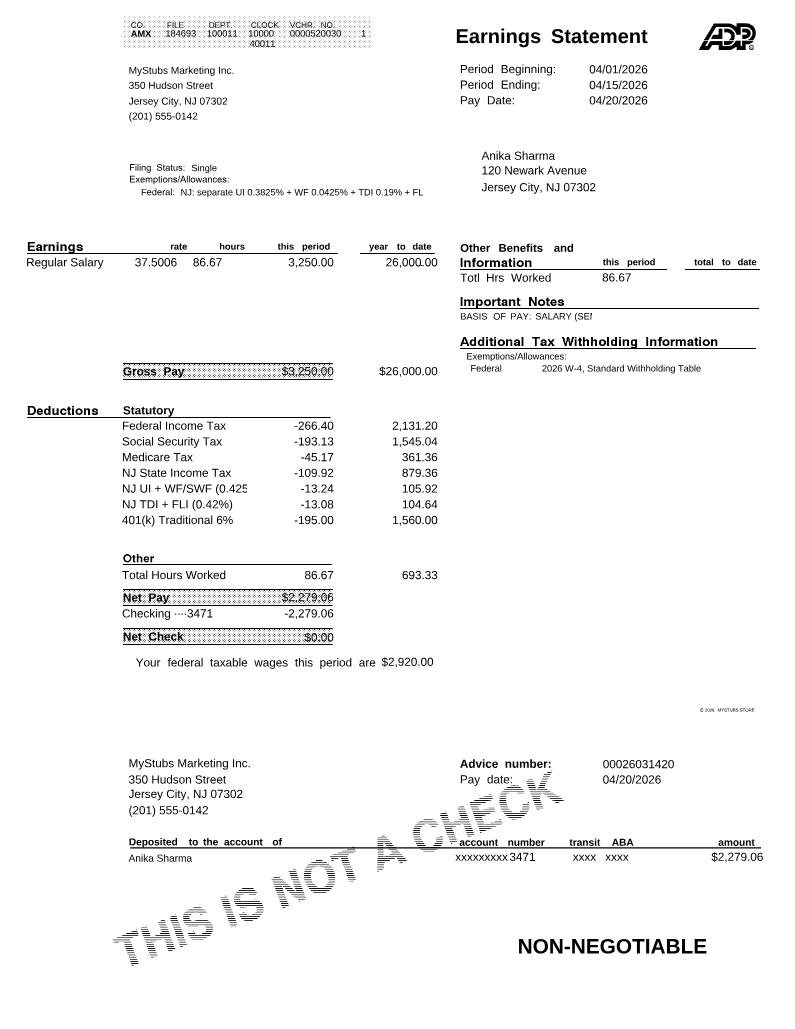
Hover or focus any numbered chip for the zone it labels.
The full numbered legend, mirrored from the chips on the figure above:
- Employer block. Legal name, full street address, federal EIN (full or last-4), state employer ID. Every later tax and payment line ties back to this entity.
- Employee block. Name as it appears on the W-2, last-4 SSN, employee ID, address, department. Full SSN must be redacted under state identity-theft statutes in 18+ states.
- Pay-period information. Period start date, period end date, pay date, and frequency (weekly / biweekly / semi-monthly / monthly). §226(a)(6) requires all three dates explicitly.
- Earnings. Every pay type broken out on its own line: regular, overtime, double-time, holiday, PTO, sick, bonus, commission, tips reported. Rate and hours required per §226(a)(9).
- Hours worked. For nonexempt employees, hours must be shown where state law requires it (CA §226 requires total hours per period, except as provided by statute). For salaried-exempt employees, some employers include an implied hours figure (salary ÷ 2,080) for verifier readability, but state requirements vary and exempt employees may be treated differently under the same statutes.
- Pre-tax deductions. 401(k), HSA, FSA, Section 125 health and dental. These reduce taxable wages before any tax line runs (Gross − Pre-tax = W-2 Box 1).
- Tax withholdings. Federal income tax (Pub 15-T percentage method), Social Security 6.2 %, Medicare 1.45 % (+0.9 % over $200K), state income tax, state-program lines (NJ four lines, CA SDI, NY SDI/PFL).
- Post-tax deductions. Roth 401(k), garnishments (capped at 25 % of disposable earnings under CCPA Title III), union dues, group-term life imputed income above the §79 threshold. Itemized separately from pre-tax.
- Employer contributions. 401(k) match, employer-paid health/dental, FUTA, SUTA, imputed group-term life. Informational only; never reduces employee gross or net pay.
- YTD totals. Running cumulative column on every earnings and deduction line. California courts read §226 to require it. Mortgage underwriters reject any stub without it regardless of state.
- PTO balances. Accrued, used, and available, with vacation and sick separated where state statutes mandate (CA, OR, WA, CO, NY ESSTA, NJ Earned Sick).
- Net pay and payment method. The deposit-settled figure (Gross − Pre-tax − All taxes − Post-tax) plus direct-deposit last-4 or check number per §226(a)(5) and NACHA ACH rules.
The figure is the linchpin reader artifact. Readers scan it against their own stub line by line before reading any prose.
Paystub Generator
Build the same twelve-zone layout for your own paystub
Generate professional paystubs in the same field order shown in the annotated figure above — employer block, employee block, pay-period dates, earnings, hours, pre-tax deductions, tax withholdings, post-tax deductions, employer contributions sidebar, YTD totals, PTO balances, and net pay.
Create a Complete PaystubWhat Counts as a Reconcilable Wage Statement
A verifier reads the document holistically, not state-by-state. The taxonomy below maps every income line a stub can carry to whether it touches gross, federal taxable wages, FICA wages, and net.
| Line item | Hits gross? | In FIT Box 1? | In FICA Box 3? | In net? |
|---|---|---|---|---|
| Regular wages | Yes | Yes | Yes | Yes |
| Overtime / double-time | Yes | Yes | Yes | Yes |
| Holiday / PTO / sick paid | Yes | Yes | Yes | Yes |
| Bonus | Yes | Yes | Yes | Yes |
| Tips reported | Yes | Yes | Yes | Yes |
| Traditional 401(k) | — | No (reduces Box 1) | Yes (FICA-taxable) | No |
| Roth 401(k) | — | Yes | Yes | No (post-tax) |
| Section 125 health | — | No | No | No |
| HSA contributions | — | No | No (if through §125) | No |
| Employer 401(k) match | — | No | No | No (employer-paid) |
| Employer health premium | — | No | No | No (employer-paid) |
| Group-term life > $50K (imputed) | — | Yes | Yes | No (imputed only) |
| Roth IRA outside payroll | — | — | — | — (not on stub) |
How to Reconcile a Paystub
Reconciling a paystub is a three-step routine you can run before any document goes to a lender, landlord, or screening platform. The fastest path uses a single tool plus the rates published by your state. No spreadsheet required.
- Open the MyStubs paycheck calculator for your state. The calculator carries the current-year rates and wage bases for every state-specific line: FIT through Pub 15-T, FICA at 6.2 % / 1.45 %, your state income tax brackets, plus state-program lines (NJ UI/WF/TDI/FLI, CA SDI, NY SDI/PFL, etc.) at the rates the state agency last published. Enter the gross, pay frequency, filing status, and pre-tax elections from the stub you're checking.
- Read off the state rates and tax amounts that the calculator returns. These are the same figures your employer's payroll system should be applying for the same period. Note each line: federal income tax, Social Security, Medicare, state income tax, every state-program line, and the cumulative pre-tax-to-net math.
-
Compare line by line against the printed stub.
Each tax amount on the calculator should match the corresponding line on the stub within a dollar or two of rounding. Pre-tax deductions should land exactly. The period reconciliation (
Gross − Pre-tax − All taxes − Post-tax = Net) should tie out to the printed net within a couple of cents. Year-to-date totals should be the period total × periods elapsed.
If any line is off by more than rounding, that's the line to question. Either the rate is stale, the wage base is wrong, or a pre-tax election is misclassified. Send the cover-note template below to payroll citing the specific line and the state agency rate it should match.
For the documentation case (the worked example two sections down), the period math runs $3,250 − $330 pre-tax − $602.19 taxes − $0 post-tax = $2,317.81 net. The YTD column at period 8 ties at 8 × $2,317.81 = $18,542.48. The year-end W-2 reconciles to Box 1 $70,080 (gross − §125 − 401(k)) and Box 3 $74,760 (gross − §125 only; 401(k) stays in the FICA base).
Anika's New Jersey Stub, Line by Line
The full computation that produces Anika's $2,317.81 net pay, in the order it appears on the printed stub:
| Line | Math | Amount |
|---|---|---|
| Gross | $78,000 ÷ 24 | $3,250.00 |
| 401(k) pre-tax 6% | 6% × $3,250 | −$195.00 |
| Section 125 health | flat | −$135.00 |
| Federal taxable wages | $3,250 − $330 | $2,920.00 |
| Federal income tax (annualized $70,080 − $8,600 std = $61,480 adj.; $5,264.50 + 22% × $905 = $5,463.60 annual ÷ 24) | Pub 15-T %-method, single, semi-monthly | −$227.65 |
| Social Security | 6.2% × $3,115 (gross less §125; 401(k) stays in FICA base) | −$193.13 |
| Medicare | 1.45% × $3,115 | −$45.17 |
| NJ state income tax | $74,760 annualized through NJ single brackets ÷ 24 | −$109.92 |
| NJ UI employee | 0.3825% × $3,115 (cap $44,800 / 2026) | −$11.92 |
| NJ Workforce / SWF | 0.0425% × $3,115 (cap $44,800 / 2026) | −$1.32 |
| NJ TDI | 0.19% × $3,115 (cap $171,100 / 2026) | −$5.92 |
| NJ FLI | 0.23% × $3,115 (cap $171,100 / 2026) | −$7.16 |
| Net pay | $3,250 − $330 pre-tax − $602.19 taxes | $2,317.81 |
New Jersey doesn't exclude 401(k) from state taxable wages, only Section 125, so NJ-taxable wages are $3,115 per period, not $2,920. That treatment, combined with the four NJ state-program lines, is one reason a New Jersey paycheck can net less than a same-gross paycheck in another state, depending on income level, city tax, and state-program exposure. Anika's stub satisfies §226's nine-item test even though she works in New Jersey, and her YTD through period 8 of $18,542.48 ties back to a year-end Box 1 of $70,080 and Box 3 of $74,760.
Common Mistakes That Get Stubs Rejected
Stub-anatomy red flags a verifier or auditor catches:
- 401(k) reducing FICA wages (traditional 401(k) is FICA-taxable; only §125 reduces Box 3). Would have made Anika's SS line $193.13 implausibly low
- §125 line present but Box 1 not reduced (mathematically impossible: the two figures move together)
- Missing YTD column on a California, New York, or other strict-state stub
- NJ state-program lines collapsed into one (UI, WF, TDI, FLI must each print on their own line under the rate notice)
- CA SDI at the prior-year 1.20% rate when 2026 is 1.30%
- Pre-tax health premium showing in §125 but Box 3 not reduced by the same amount
- Net pay greater than gross, or greater than gross minus all withholdings
- Pay-period dates that contradict the stated frequency (semi-monthly stub printing weekly-shaped end dates)
- Missing pay-period start, end, OR pay date. §226(a)(6) requires all three
Honest mistakes that look like fraud:
- Nickname on the stub vs. legal name on the ID ("Bob" vs. "Robert," or "Priya Devi" on the W-2, "Priya" on the binder)
- Full SSN printed instead of last-4 (violates state identity-theft statutes in 18+ states)
- Pay period labeled only by month ("April 2026"), no start/end dates
- Bonus paid in a different period than worked, with no annotation
- Implied hours missing on a salaried-exempt stub. Anika's 86.67 hrs/period line is the example. Without it, the effective rate can't be checked against state minimum wage
- Blended earnings line for a multi-rate employee (fails §226(a)(9))
- PTO shown only as "accrued" with no "used" or "available"
The fix for every honest mistake: ask payroll for a corrected statement before the original reaches a third party. Most payroll systems reissue within the same pay cycle, and the cover-note template below is the fastest way to start that request.
Copy, paste, and fill the bracketed fields. Use this when a stub is missing a required item or the math doesn't reconcile and you need the corrected version before sending the document to a lender, landlord, or screening platform.
Anika never had to send this template. Her ADP stub clears §226 by default. But the request structure is what a payroll administrator expects: cite the specific missing item, name the authority, give the reason, and request the corrected PDF with a deadline tied to the verifier's submission window.
Example Stub by Worker Type
The twelve zones stay the same. The line items inside each zone shift by how the worker is paid.
| Zone | Salaried-exempt | Hourly non-exempt | Multi-rate hourly | Tipped | Commission |
|---|---|---|---|---|---|
| Employer block | Yes | Yes | Yes | Yes | Yes |
| Employee block | Yes | Yes | Yes | Yes | Yes |
| Pay-period info | Yes | Yes | Yes | Yes | Yes |
| Earnings — regular | Salary line | Hourly × rate | Multiple rate lines | Hourly + tips reported | Base + commission |
| Earnings — overtime | If applicable | Required | Required at OT rate | Required | If applicable |
| Hours worked | Implied (salary ÷ 2080) | Actual | Actual per rate | Actual + tip-credit line | Implied |
| Pre-tax deductions | Yes | Yes | Yes | Yes | Yes |
| Tax withholdings | Yes | Yes | Yes | Yes (incl. FICA on tips) | Yes |
| Post-tax deductions | Yes | Yes | Yes | Yes | Yes |
| Employer contributions | Sidebar | Sidebar | Sidebar | Sidebar (employer share of tips FICA) | Sidebar |
| YTD totals | Yes | Yes | Yes | Yes (separate tip YTD) | Yes (separate commission YTD) |
| PTO balances | Yes | Yes | Yes | Yes | Yes |
| Net pay + method | Yes | Yes | Yes | Yes | Yes |
| Check | Anika's stub passes when |
|---|---|
| Legal employer name matches the secretary-of-state registry | "Apex Digital Marketing LLC" matches NJ business records |
| Full street address present (no PO box alone) | "1200 Hudson Street, Jersey City, NJ 07302" present |
| EIN in XX-XXXXXXX format, last-4 acceptable | XX-XXX4827 prints in the employer block |
| Employee legal name matches the ID being sent alongside | "Anika Sharma" on stub matches NJ driver's license |
| Last-4 SSN only; full SSN redacted or absent | "xxx-xx-4419" — full SSN never printed |
| Pay-period start date, end date, and pay date all explicit | 04/01/2026, 04/15/2026, 04/20/2026 |
| Pay frequency stated (weekly / biweekly / semi-monthly / monthly) | "Semi-monthly (period 8 of 24)" |
| Every earnings line shows rate and hours (or implied hours for salaried) | Salary-exempt; implied 86.67 hrs/period printed |
| Pre-tax deductions itemized line by line with YTD | 401(k) −$195.00 (YTD $1,560); §125 −$135.00 (YTD $1,080) |
| Federal income tax, Social Security 6.2%, Medicare 1.45% all present | $227.65 / $193.13 / $45.17 |
| State income tax present if state has one | NJ state tax $109.92 |
| State-program lines complete (NJ four lines, NY SDI/PFL, CA SDI, etc.) | UI $11.92 + SWF $1.32 + TDI $5.92 + FLI $7.16 = $26.32 |
| Post-tax deductions itemized separately from pre-tax | None this period — pre-tax stack is alone |
| YTD column populated on every earnings and deduction line | YTD gross $26,000 / YTD net $18,542.48 ties to 8 × period |
| PTO balance shown (accrued, used, available) where state mandates | Vacation 53.33/16.00/37.33; NJ Earned Sick 13.33/0/13.33 |
| Net pay reconciles: Gross − Pre-tax − Taxes − Post-tax = Net | $3,250 − $330 − $602.19 − $0 = $2,317.81 ✓ |
| Payment method shown (DD last-4 or check number) | "DD ending 4882 (Chase)" |
For reconstructing a stub from a past period (say, three consecutive stubs a landlord requires after a job change), the MyStubs paystub generator renders the same twelve-zone layout used above, populated from real W-2 totals and a chosen pay-period schedule. It's a layout instrument for documenting real wages, not a fabrication product.
Wage Theft, Penalties, and Worker Rights
The DOL's Wage and Hour Division enforces the federal recordkeeping floor. Every strict-mandate state has its own enforcement arm. California's PAGA deputizes private attorneys to bring §226 violations on the state's behalf. The penalty layers under §226 itself: subsection (e) imposes the $50 first-violation / $100 subsequent-violation civil penalty per employee per pay period (with PAGA letting a private plaintiff recover the same amount), and subsection (f) adds a $250 penalty for failure to comply with an employee's request to inspect or copy wage records within 21 days. Together they're the reason §226 settlements regularly cross seven figures at multi-employee employers. New York's WTPA caps wage-statement penalties at $5,000 per employee and stacks separately from unpaid-wage damages.
For Anika, the §226 layer is preventative: her ADP stub satisfies the nine-item list by default, so the PAGA exposure on her employer ($50 × 24 periods × every NJ employee) never materializes. The check on a real stub takes ten seconds. Name and address present, hours implied, pre-tax itemized, taxes itemized, YTD column on every line, net pay computed against the printed totals.
Workers in non-mandate states aren't without recourse. The FLSA recordkeeping rule requires the data on file, and the DOL complaint process lets a worker request inspection through a Wage and Hour investigator. Mortgage underwriters and tenant-screening platforms enforce de facto stub standards. A wage statement that fails their reconciliation gets the application denied regardless of state.
For related guides on the documents that pair with a complete paystub, see paystub vs bank statement vs 1099 income proof, the free paycheck calculator by state for the math behind each line, how do apartments verify income for what landlords reconcile a stub against, and payroll tax vs. income tax for the federal-vs-state layer breakdown.
Is a paystub required by federal law?
No. The Fair Labor Standards Act requires employer recordkeeping but doesn't require a printed wage statement. Many states require a statement on payday, and a smaller group enumerates specific line items and penalties. The DOL's Fact Sheet 21 is the federal source. Texas sits in the middle: it requires a written earnings statement under Labor Code §62.003 , but not a California-style §226 layout. Often misread as a no-mandate state because the federal floor is FLSA recordkeeping. Florida, Alabama, Georgia, and Tennessee have no state-level print mandate, but most employers issue stubs anyway because the data is already in payroll.
What is the minimum a state-mandated paystub must show?
The common floor: employer name and address, employee name with last-4 SSN, pay-period dates, hours worked, rate of pay, gross wages, every itemized deduction, and net pay. California's nine-item list under Labor Code §226 is the most-copied template. New York's WTPA goes further with allowances and a translated wage notice at hire. A stub designed for §226 covers most weaker mandates by default, though state-specific delivery, notice, sick-leave, and industry rules should still be checked.
Can my paystub be electronic?
Yes in most states, provided the employee can access and print it without difficulty and the employer maintains the underlying records under FLSA §516. California, Hawaii, Maine, Oregon, and Vermont have specific consent or opt-out language. Employees can require paper on request. The FLSA is silent on medium. What matters is whether the state-mandate content is delivered. Employers should also confirm employees can access archived stubs after separation.
Why does my New Jersey paystub show four separate state-program deductions?
Because New Jersey funds four distinct employee-paid insurance programs through payroll. For 2026: NJ UI at 0.3825% capped at the $44,800 wage base, NJ Workforce/SWF at 0.0425% on the same $44,800 cap, NJ TDI at 0.19% capped at the $171,100 base, and NJ FLI at 0.23% on the same $171,100 cap. Rates come from the NJ DOL employer rate notice and the NJ MyLeaveBenefits Employer Guide . Cumulative drag: roughly 0.85% of gross. That's the structural reason a NJ paycheck nets less than a same-gross NY or PA paycheck.
My paystub is missing the YTD column. Is that legal?
In some states and payroll contexts, missing YTD totals can create compliance or verification problems. California's §226 focuses on accurate itemized wage-statement fields for the pay period; lenders, landlords, and screening platforms often expect a YTD column even when state law does not expressly require it. In Texas, Florida, Alabama, and other states without an enumerated wage-statement mandate, there is generally no statutory YTD requirement, but verifiers may still reject a stub that lacks one. If the YTD column is missing, ask payroll for a corrected statement or a payroll-register summary before sending the document to a third party.
What is the difference between the twelve zones and California's nine-item list?
California §226 lists nine items the printed statement must contain: gross wages, hours worked, hourly rates, all itemized deductions, net pay, pay-period dates, employer name and address, employee name with last-4 SSN, and pay date. The twelve-zone framework is broader. It covers every information slot a complete stub carries, including employer contributions and PTO balances that §226 doesn't explicitly mandate but lenders and screening platforms expect. All twelve present and reconcilable, and §226 falls out automatically.
Does the employer have to give me a paystub if I ask?
In print-mandate states, yes. California adds a right to inspect and copy wage records on three days' written notice under §226(b)–(c), with statutory penalties for non-compliance. In no-mandate states the employer has no statutory obligation, but most print because the data already exists in payroll. A written request with a specific reason ("I need three consecutive stubs for a mortgage application") usually produces the documents within a pay cycle.
What happens if the period and YTD math do not reconcile?
The stub is commonly rejected by serious verifiers: mortgage underwriters, leasing platforms, screening services, state-agency auditors. Period reconciliation is the first check because it's the cheapest and the most common failure point in a fabricated document. Underwriters treat the failure as a hard disqualifier. A stub printing all twelve zones but whose period math doesn't tie out is worse than one printing six zones with clean math. Ask payroll for a corrected statement before the original reaches a third party. — David Whitaker, Payroll & Wage Education writer at MyStubs. David has spent ten years covering federal recordkeeping rules, state wage-statement mandates, and the reconciliation checks that mortgage underwriters and tenant-screening platforms actually run on a paystub before they approve a file.
Official sources
Sources · 21 references
- U.S. Department of Labor — FLSA Recordkeeping Fact Sheet 21
- U.S. Department of Labor — 29 CFR 516 Records Required of Employers
- Internal Revenue Service — Publication 15 (Circular E), Employer's Tax Guide
- Internal Revenue Service — Publication 15-T, Federal Income Tax Withholding Methods 2026
- Internal Revenue Service — Section 125 Cafeteria Plans
- Internal Revenue Service — 401(k) Plan Overview
- Social Security Administration — 2026 Contribution and Benefit Base
- California Department of Industrial Relations — Labor Code §226 Itemized Wage Statement
- California DLSE — PAGA Enforcement
- California EDD — 2026 Payroll Tax Rates and Withholding
- New Jersey Treasury — Division of Taxation, Payroll Withholding
- New Jersey Department of Labor — Employer Rate Information (UI / WF / TDI)
- New Jersey Department of Labor — MyLeaveBenefits Employer Guide (TDI / FLI)
- New Jersey Department of Labor — Earned Sick Leave Law
- New York Department of Labor — Wage Theft Prevention Act §195.3
- Washington L&I — RCW 49.46 Paystub Requirements
- Massachusetts Attorney General — M.G.L. c.149 §148 Wage Act
- Illinois Department of Labor — 820 ILCS 115/14 Wage Payment and Collection Act
- Texas Workforce Commission — Texas Payday Law
- New York City CCHR — Earned Safe and Sick Time Act
- U.S. Department of Labor — CCPA Title III Wage Garnishment Limits


Discussion
No comments yet — be the first to share a state-specific note, a follow-up question, or a correction.